
Let’s Not Use Unnecessary Colour Spaces
A colour space is essentially the language used to communicate colour information in a photographic file, a printed image or any other medium used to display a photograph.
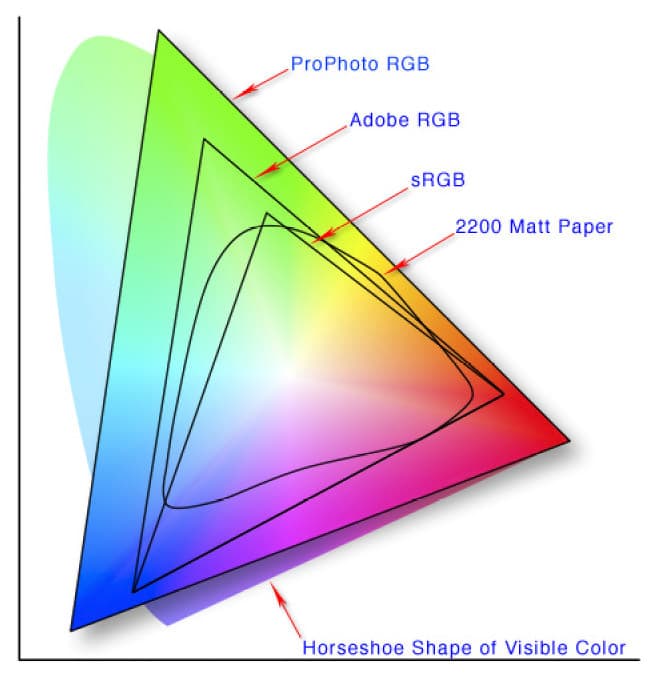
As shown in the diagram, there are different colour spaces designed to describe image information. You can think of them in a similar way to spoken languages such as Spanish or English.
Some colour spaces are richer than others, meaning they are capable of describing a wider range of colours. The diagram gives a good idea of the differences between them.
Physical media, such as photographic paper, also have their own colour limitations. Not every colour can be reproduced on a sheet of paper using ink, just as sRGB cannot describe every colour that exists.
Two of the most commonly used colour spaces are sRGB and Adobe RGB, with Adobe RGB covering a wider range of colours.
So the question is: which one should we use?
For most situations, I use sRGB.
Why? Because for the vast majority of photographs, sRGB provides more than enough colour information. There are many other factors that have a much greater influence on the quality and impact of an image.
Most importantly, sRGB has traditionally been the standard colour space used by computers and many consumer devices.
If you deliver photographs digitally to a client, there is a good chance they will view them on an ordinary computer, tablet or phone. Using the most widely supported colour space reduces the risk of unexpected colour changes.
Basic digital cameras also commonly use sRGB by default, and many consumer photo-printing services expect files in this colour space.
For that reason, it often makes sense to work with the most compatible option. Not everyone uses a professionally calibrated display or sends photographs to a specialist photographic laboratory.
Of course, when trying to achieve the highest possible quality in professional printing, other colour spaces may be useful. Adobe RGB, for example, can provide a wider gamut and may allow certain printing systems to reproduce colours that fall outside sRGB.
But how often are you actually going to send a JPG to a professionally calibrated laboratory that understands and takes full advantage of Adobe RGB?
In my case, not very often — and for most of my clients, practically never.
Another important consideration is web use. If the photographs are mainly intended for websites, sRGB is generally the most practical choice because it has traditionally been the standard colour space for the web.
Browser support for embedded colour profiles has evolved considerably over time, but the basic principle remains the same: for maximum compatibility across different screens and devices, sRGB is usually the safest option.
Thanks for visiting!
Conversation